A4 Envelope Template: A Practical Tool for Professional and Creative Workflows
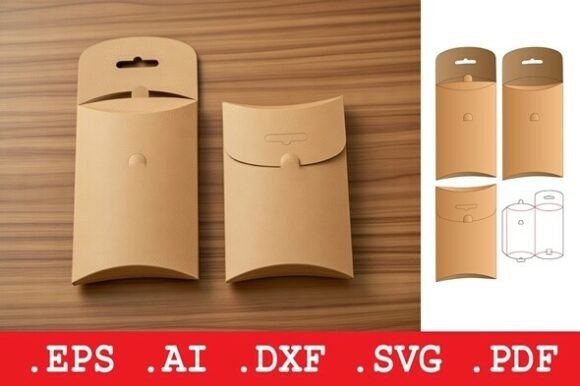
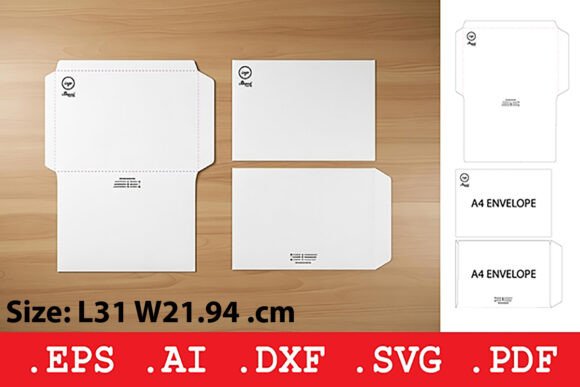
The A4 Envelope Template is a versatile design solution for professionals and creators who need to produce high-quality envelopes efficiently. Designed to fit standard A4-sized documents, this template includes secure side flaps with a tuck-in closure, making it ideal for mailing invitations, certificates, promotional materials, and more. Whether you're a small business owner preparing marketing mailers or a designer crafting custom stationery, this template streamlines the packaging process while offering room for branding and personalization.
How the A4 Envelope Template Fits Into Broader Workflows
Before diving into a print or packaging project, it's essential to consider how each component integrates into the overall workflow. The A4 Envelope Template functions as a foundational element that bridges design, production, and delivery. It’s commonly used after the content creation phase—such as finalizing a brochure or invitation—and before the physical distribution or mailing stage.
For marketers preparing a campaign, this template can be incorporated into a larger asset management process. Designers can align branding elements like logos and color schemes directly into the template, ensuring consistency across materials. Once printed and folded, the envelope becomes part of a coordinated delivery system that enhances professionalism and user experience.
Key Features and File Compatibility
One of the standout benefits of the A4 Envelope Template is its compatibility with a range of production tools and platforms. The included file formats—.DXF, .SVG, .EPS, .PDF, and .AI—allow for flexibility in both digital and physical production environments:
- .DXF files work seamlessly with CNC and laser cutting machines, ideal for industrial-scale production.
- .SVG provides a scalable vector format suitable for digital design and craft cutters.
- .EPS ensures compatibility with industrial printing equipment for high-volume runs.
- .PDF offers a print-ready layout for manual cutting or small-batch production.
- .AI files give full customization options for designers using Adobe Illustrator.
This variety ensures that whether you're a solo creator working from home or a print shop handling bulk orders, the A4 Envelope Template adapts to your existing tools and processes without requiring additional software or hardware investments.
Integration with Design and Production Tools
The A4 Envelope Template works best when integrated with other design and production tools. For instance, using Adobe Illustrator (.AI) files allows for direct editing and alignment with other brand assets. Designers can layer graphics, test color variations, and preview the final envelope layout before printing.
When used alongside project management tools like Trello or Asana, the template becomes part of a structured workflow. For example, a freelance designer working on a client’s wedding invitation suite can assign a task for envelope customization, set a deadline, and upload the final file for client review—all within a shared digital space.
For small businesses or educators printing certificates or awards, integrating the template with a print management system ensures consistency across batches. This helps maintain a professional appearance and reduces errors when producing large quantities.
Practical Implementation Tips
Successfully using the A4 Envelope Template requires more than just downloading the file—it involves thoughtful planning and execution. Here are some practical tips to help you make the most of this tool:
- Start with the right material: The template is designed for 200–350 gsm cardstock or paperboard. Using the correct weight ensures durability and a professional finish.
- Test with a sample print: Before printing in bulk, create a test version on standard paper to check fold lines and dimensions.
- Customize for branding: Use the ample space on the front and back panels to add logos, taglines, or return addresses for consistent branding.
- Label clearly: Include a designated area for the recipient’s address. This helps with sorting and ensures your mail stands out.
- Batch production strategy: If producing envelopes in large quantities, organize your workflow by printing, cutting, folding, and sealing in separate stages for efficiency.
These steps not only improve the quality of your final product but also streamline the overall process, reducing waste and saving time.
Workflow Examples Across Industries
Let’s look at how different professionals can integrate the A4 Envelope Template into their daily operations:
- Freelance designers: When creating custom stationery or packaging for clients, designers can use the .AI file to align the envelope with the rest of the brand assets, ensuring a cohesive look.
- Marketing teams: For promotional mailers, the template can be used to send out product samples, brochures, or discount vouchers in a branded, professional format.
- Educators: Teachers or administrators preparing certificates can use the template to create uniform envelopes for award ceremonies or graduation events.
- Bloggers and content creators: Those who send out physical media kits or partnership proposals can use the template to present materials in a polished, memorable way.
- Small business owners: Entrepreneurs who handle their own shipping or promotional mail can customize envelopes for cost-effective branding.
Each of these scenarios demonstrates how the A4 Envelope Template supports both creative and logistical needs across different industries.
Ensuring Long-Term Usability and Quality Control
For ongoing use, especially in business settings, it’s important to establish quality control and maintenance practices. Store template files in a centralized digital asset management system so team members can access the most up-to-date version. If you frequently update branding, create a schedule to review and refresh the envelope design accordingly.
When printing in-house, keep a record of which paper weight and printer settings yield the best results. For those outsourcing to a print shop, share the .PDF or .EPS file along with any specific instructions to maintain consistency.
Over time, the A4 Envelope Template becomes a reliable part of your workflow—especially when integrated with other tools and processes. Whether you're preparing a one-time mailing or setting up a recurring print schedule, the template supports efficiency, consistency, and professional presentation.
Conclusion: A Versatile Solution for Real-World Needs
In summary, the A4 Envelope Template is more than just a design file—it's a practical tool that enhances both creative and operational workflows. From its compatibility with a wide range of cutting and printing systems to its adaptability across industries, this template offers a streamlined way to produce professional envelopes without compromising on quality or branding.
By understanding how to integrate it into your existing processes—whether for a marketing campaign, educational event, or personal project—you can ensure that your materials are delivered with clarity, consistency, and a polished finish. Whether you're a designer, marketer, educator, or entrepreneur, the A4 Envelope Template is a valuable addition to your toolkit.