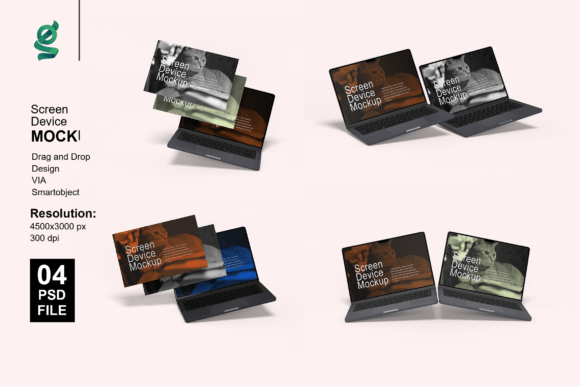
Laptop Presentation Mockups Made Simple
Creating a professional and visually appealing product presentation doesn’t have to be complicated. With LAPTOP PRESENTATION MOCKUPS, you can showcase your designs in a realistic, high-quality format without needing advanced 3D modeling skills. These mockups are ideal for designers, marketers, entrepreneurs, and anyone looking to present their digital work in a clean, professional context.
What Are Laptop Presentation Mockups?
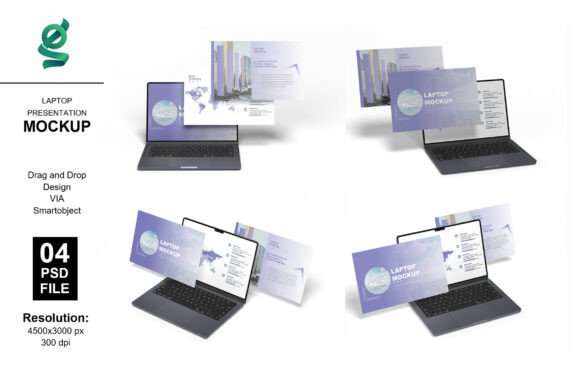
Laptop presentation mockups are digital templates that let you insert your design into a realistic image of a laptop screen. They come in the form of Adobe Photoshop files (PSD) and use smart objects, which allow for easy editing. This means you can place your design onto the mockup in just one click—no need to resize or distort your image manually.
Each mockup is high resolution (4500x3000 pixels at 300 dpi), ensuring your final output looks crisp and detailed. Whether you're creating visuals for a portfolio, client presentation, or product launch, these mockups provide a polished and professional finish.
Why Use Laptop Presentation Mockups?
Presenting your work in a real-world setting helps your audience understand how it will look in practice. A flat image of a design may not convey its impact, but when placed on a realistic laptop screen, the visual becomes more relatable and engaging.
- Save time: No need to create 3D renderings from scratch.
- Professional quality: High-resolution files ensure your presentation looks sharp.
- Easy customization: With smart objects, you can quickly swap designs without losing quality.
- Versatile use: Ideal for portfolios, websites, social media, and marketing materials.
Who Can Benefit From These Mockups?
Whether you're a beginner or a seasoned professional, laptop presentation mockups are useful for a variety of people and purposes:
- Designers: Show off web or app designs in a realistic format.
- Marketers: Create compelling visuals for campaigns or product launches.
- Entrepreneurs: Present digital products to investors or clients.
- Educators: Demonstrate digital tools or projects to students.
- Bloggers: Enhance tutorials or reviews with visual examples.
How to Use Laptop Presentation Mockups
Using these mockups is straightforward, even if you're new to Photoshop. Here's a simple step-by-step guide:
- Open the PSD file in Adobe Photoshop.
- Locate the smart object layer—this is where your design will go.
- Double-click the smart object layer to open it.
- Paste your design inside the smart object.
- Save and close the smart object tab.
- Your design now appears on the laptop screen in the mockup.
You can also adjust background colors and lighting to match your brand or personal style. All layers are organized for easy navigation, so you won’t get lost in a cluttered file.
Real-World Applications
Here are a few practical examples of how you might use these mockups:
- Portfolio Enhancement: Display your UI/UX work in a professional context.
- Social Media: Share mockups of your latest web or app design on Instagram or LinkedIn.
- Client Presentations: Show clients how your design will appear on a real laptop screen.
- Product Pages: Use mockups to show digital products like templates or software interfaces.
- Blog Content: Illustrate tutorials or reviews with realistic visuals.
What to Consider Before Choosing a Mockup
While laptop presentation mockups are incredibly useful, it’s important to choose the right one for your needs. Here are a few things to keep in mind:
- Compatibility: Ensure the mockup works with your version of Photoshop.
- Resolution: Always go for high-resolution files to maintain quality.
- Customization Options: Look for mockups with adjustable backgrounds and lighting.
- Layer Organization: A well-structured file makes editing easier and faster.
- Usage Rights: Confirm whether the mockup can be used for commercial purposes.
Why 3D Rendering Matters
LAPTOP PRESENTATION MOCKUPS 3D rendering adds depth and realism to your visuals. Unlike flat images, 3D mockups give your design a sense of space and context. This helps viewers imagine how the design will look in real life, making your presentation more persuasive and engaging.
These mockups simulate lighting and shadows naturally, which enhances the realism of your final image. Whether you're showing off a website, app interface, or digital dashboard, 3D rendering ensures your design stands out.
Final Thoughts
Laptop presentation mockups are a powerful tool for anyone who wants to present digital designs in a professional and visually appealing way. Whether you're a freelancer building your portfolio, a marketer launching a new product, or a student showcasing a class project, these mockups help you communicate your ideas more effectively.
With easy-to-use smart objects, customizable backgrounds, and high-resolution outputs, LAPTOP PRESENTATION MOCKUPS offer a simple yet professional solution. They save time, enhance your visuals, and help you make a strong impression—without the need for complex 3D modeling or design expertise.