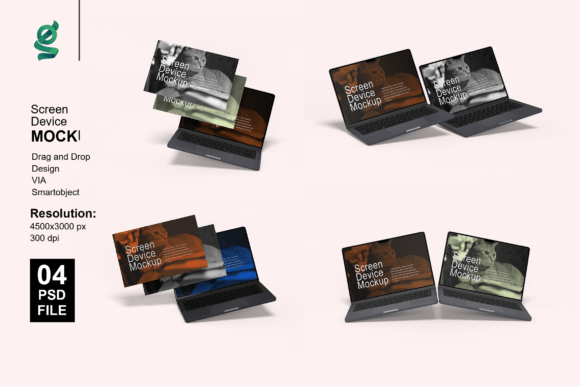
Screen Device Laptop Mockup: A Smart Tool for Professional Product Presentations
Creating compelling visual presentations of digital designs is essential for professionals across various industries. Whether you're a web designer, app developer, or marketer, Screen Device Laptop Mockup offers a streamlined way to showcase your work with realism and precision. This article explores what this mockup tool entails, how it functions, and who can benefit from using it.
What Is a Screen Device Laptop Mockup?
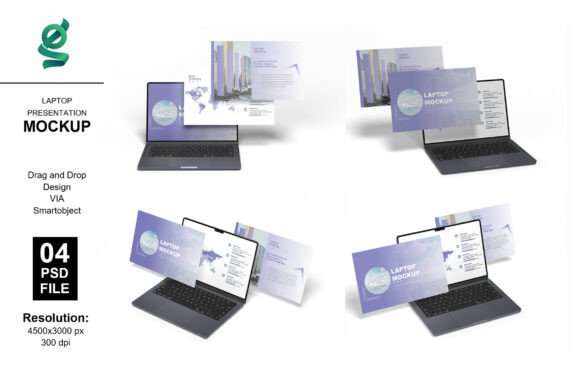
A Screen Device Laptop Mockup is a digital template that allows designers to insert their graphics, websites, or applications into a realistic laptop screen environment. These mockups are typically provided in Adobe Photoshop format and utilize smart objects to enable easy customization. With a high-resolution output of 3000x2000 pixels and 300 dpi, they are ideal for both web and print use.
Key Features of the Screen Device Laptop Mockup
The Screen Device Laptop Mockup package usually includes several valuable components:
- 4 Adobe Photoshop Files (PSD) – Each file is designed for different presentation styles and angles.
- Smart Object Support – Allows for one-click insertion of your design with full resolution retention.
- Customizable Background Colors – Adjust the backdrop to match your brand or project aesthetic.
- Adjustable Lighting – Enhance the visual appeal by modifying light settings to suit your design.
- High Resolution – Crisp, clear visuals at 3000x2000 pixels and 300 dpi.
- Well-Organized Layers – Makes editing straightforward and efficient within Photoshop.
How to Use the Screen Device Laptop Mockup
Using the Screen Device Laptop Mockup is a simple and intuitive process:
- Open the PSD file in Adobe Photoshop.
- Locate and double-click the smart object layer.
- In the new tab that opens, paste your design onto the designated area.
- Save and close the smart object tab.
- Observe how your design now appears on the laptop screen within the mockup.
It's important to note that any model images or photographs used in the preview are for presentation purposes only and are not included in the final file.
Purpose and Value of Laptop Mockups
The Screen Device Laptop Mockup serves as an essential tool for presenting digital content in a professional manner. Here are some of the main benefits:
- Realistic Visuals – Helps clients and stakeholders visualize how a design will appear in a real-world setting.
- Time-Saving – Eliminates the need to create mockups from scratch, allowing more time for actual design work.
- Professional Presentation – Enhances portfolios, client proposals, and marketing materials with polished visuals.
- Easy Customization – Designers can quickly swap out visuals without altering the overall layout or perspective.
Who Can Benefit from Using This Mockup?
The Screen Device Laptop Mockup is versatile and can be used by a wide range of professionals:
- Web Designers – Showcase website layouts or UI/UX designs in a realistic laptop format.
- App Developers – Present mobile or desktop app interfaces as they would appear on a laptop screen.
- Marketers – Create high-quality visuals for campaigns, landing pages, or product announcements.
- Freelancers and Agencies – Improve client presentations and portfolio displays with minimal effort.
- E-commerce Businesses – Display digital products or software solutions in a visually engaging way.
Real-World Applications of the Mockup
Here are a few examples of how the Screen Device Laptop Mockup can be applied:
- Portfolio Enhancement – Designers can add high-quality images of their work to online portfolios or resumes.
- Client Presentations – Use mockups to show how a website or app will look on a laptop screen before development begins.
- Social Media Content – Share sleek visuals of your latest design project on platforms like Instagram, LinkedIn, or Pinterest.
- Product Launches – Generate excitement around a new digital product with professional-looking promotional images.
Strengths of the Screen Device Laptop Mockup
One of the most notable strengths of this mockup is its ease of use. Even those with minimal Photoshop experience can quickly insert their designs using the smart object feature. Additionally, the high resolution and customizable background ensure that the final output meets professional standards. The organized layers also make it easy to adjust lighting, perspective, or color without disrupting the overall design.
Considerations and Limitations
While the Screen Device Laptop Mockup is a powerful tool, it's important to understand its limitations:
- Requires Adobe Photoshop – The mockup must be edited using Photoshop, which may not be accessible to everyone.
- Not a Standalone Product – It is designed to present existing designs, not to create them from scratch.
- Learning Curve – Beginners may need a brief tutorial to understand how smart objects work within Photoshop.
Evaluating Suitability for Your Project
When considering whether the Screen Device Laptop Mockup is right for your needs, ask yourself the following questions:
- Do I need to present digital designs in a realistic and professional format?
- Am I using Adobe Photoshop or willing to learn its basic functions?
- Is visual clarity and high resolution important for my final output?
- Do I need a reusable template that saves time and effort?
If the answer is yes to most of these, then this mockup is likely a great fit for your workflow.
Conclusion
The Screen Device Laptop Mockup is more than just a visual tool—it’s a practical solution for professionals who need to present their digital work with clarity and impact. Its combination of ease of use, customization options, and high-resolution output makes it a valuable asset for designers, developers, and marketers alike. Whether you're preparing a portfolio, pitching to a client, or launching a product, this mockup can help you deliver a polished and professional result with minimal effort.